

An app development contract should answer six questions: what's being built (every screen), what you pay and when, how changes are priced, how you sign off the work, who owns the code and from when, and whose name the App Store and Google Play accounts are in. If any answer is vague, fix it before you sign.
Our own contracts answer all six, so here's my bias up front: the clauses I'd read twice are 5 and 6. In the US, the UK and Australia, paying for code doesn't make it yours. The contract has to hand it over to you.
I'm not a lawyer, so every law and store rule below is linked to the official page, checked on 11 November 2026. You don't have to take my word for any of it.

1. Scope: the screen list and the exclusions
Every other clause points back to the scope. A fixed price, a change request and an acceptance test only mean something if it's written down. It should list every screen, including standard ones such as sign-up and settings, the core flow, what the admin dashboard does, and what's excluded (content writing, store fees, hosting). Our app requirements document template shows what to put in one.
Red flag: "a fully featured app" with no screen list. That describes a hope, not an app.
2. Milestones and payment stages
Each payment after the first should be tied to something you can check yourself: the core flow on your own phone, every agreed screen working, a store submission from your account. Payments by calendar date, or half the price up front, put the risk on you. Holding back a final share until after launch keeps launch fixes quick.
Our own stages are set this way, so I'm not neutral here.
3. Change requests
Scope always moves. The contract should say how: you ask, the developer prices the change in writing, and no work starts until you approve. Check which rate or price list applies, and how many feedback rounds each milestone includes. Without this clause, a fixed price drifts like an hourly one; see fixed price vs hourly app development.

4. Acceptance testing
This clause says how a milestone is signed off: how many working days you have to test, what counts as a pass (the app does what the scope says), and how bugs get fixed. Test a build you install, not a screen-share. Apple's TestFlight and Google Play's internal testing let any developer send you one.
Red flag: "deemed accepted" after a short window.
5. Who owns the code an app developer writes?
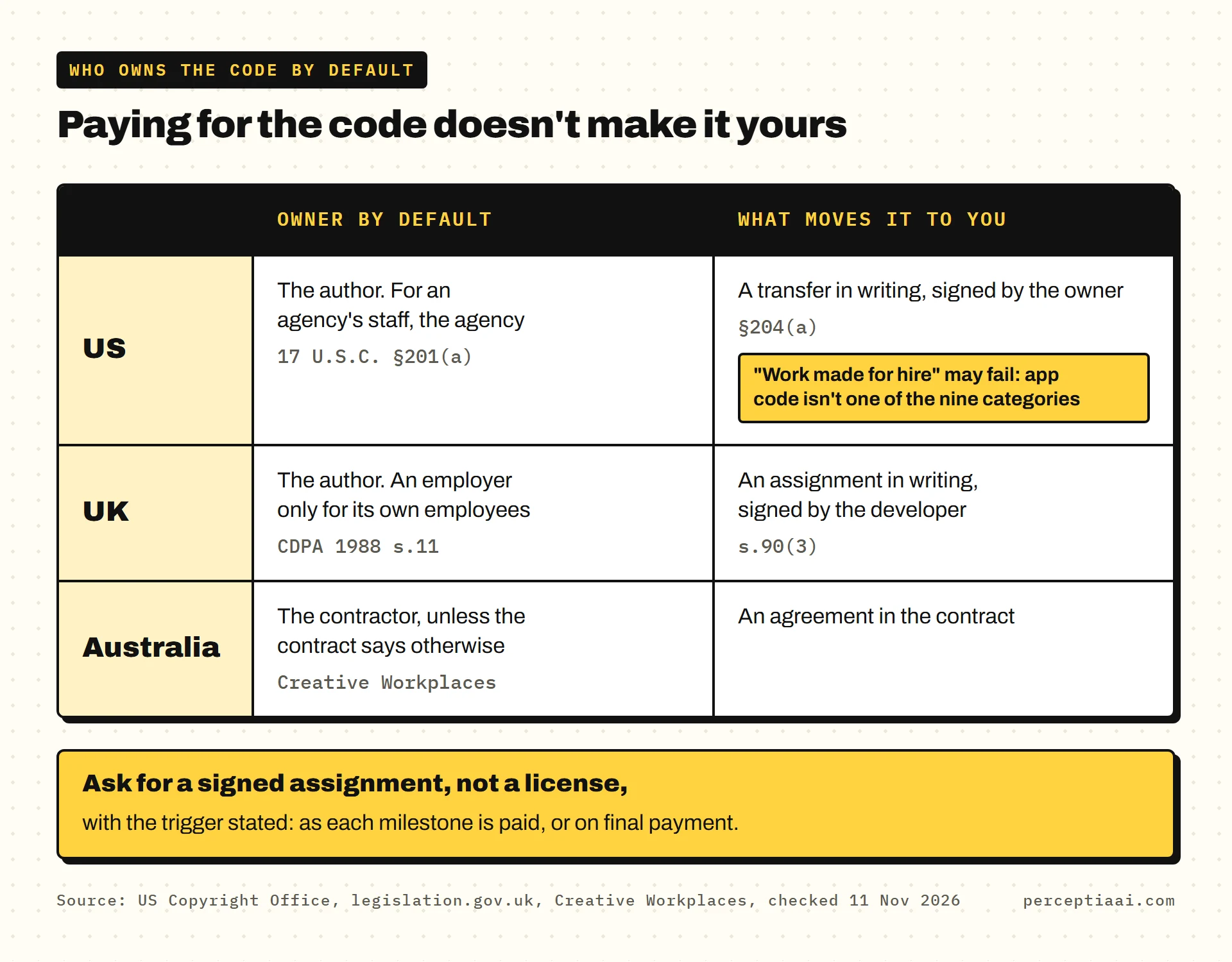
Unless your contract says otherwise, usually the developer. In the US, UK and Australia, paying for the work doesn't by itself make you the owner of the code. The contract has to move it to you.
United States
US law starts with the author. Title 17, chapter 2, §201(a): "Copyright in a work protected under this title vests initially in the author or authors of the work." And §204(a): "A transfer of copyright ownership, other than by operation of law, is not valid unless an instrument of conveyance, or a note or memorandum of the transfer, is in writing and signed by the owner of the rights conveyed or such owner's duly authorized agent."
So the code starts out as the developer's, and only a signed document moves it to you. A paid invoice doesn't.
Many contracts reach for "work made for hire" instead. The U.S. Copyright Office's Circular 30, Works Made for Hire (revised 08/2024) sets four tests for a commissioned work, the first being one of nine categories, and says: "If a work fails to satisfy any of these requirements, it is not a work made for hire."
The nine are publishing and film categories, such as translations, compilations, tests and atlases. Custom app code isn't one of them, and code written by an agency's own staff belongs to the agency as their employer. So a "work made for hire" line may not make you the owner. I'd ask for a written assignment of copyright as well, signed by the developer, before anything else.
United Kingdom
The Copyright, Designs and Patents Act 1988 counts "a computer program" as a literary work (section 3(1)), and section 11(1) gives it to the author first: "The author of a work is the first owner of any copyright in it, subject to the following provisions." The main exception is section 11(2): "Where a literary, dramatic, musical or artistic work, or a film, is made by an employee in the course of his employment, his employer is the first owner of any copyright in the work subject to any agreement to the contrary."
That exception is narrower than it looks.
The employer rule covers employees only. An agency or freelancer you commission isn't your employee, so you need an assignment, and section 90(3) sets its form: "An assignment of copyright is not effective unless it is in writing signed by or on behalf of the assignor."
Australia
The law is the Copyright Act 1968. The Australian Government's Creative Workplaces site, run by Creative Australia, states the default: "Intellectual property created by an independent contractor is owned by the contractor unless it is otherwise agreed in the contract." Employees are the other way round: what they create in the course of their employment "is owned by the employer unless it is otherwise agreed in the employment contract."
Three countries, one answer: if the contract is silent, the code stays with the developer.
What the ownership clause should say
- The code, designs and other work for your app pass to you, with the trigger stated: as each milestone is paid, or on final payment.
- It's an assignment of copyright signed by the developer, not just a license.
- The developer's own pre-existing tools are licensed to you permanently, so you can keep changing the app without them.
- Any subcontractor has assigned their work to the developer, so it can pass on to you.
6. Who owns the App Store and Google Play accounts
The code is half of owning an app. The other half is the store listing, with its users and ratings, which lives in a developer account.
Apple's enrollment page tells the person enrolling an organization: "you'll be the Account Holder and must have the legal authority to bind your organization to legal agreements." It adds: "Your organization's name will be displayed as the seller name of your apps on the App Store."
That second line is the one to notice. Whoever enrolled is the seller your users see. Membership is "99 USD per membership year", and Google's Play Console help says: "There is a US$25 one-time registration fee."
If the app sits in the developer's account instead, getting it back depends on them. Here are the official rules for moving it:
| Moving | What the official page says |
|---|---|
| An app between Apple accounts | "Your membership Account Holder initiates the app transfer." "The receiving Account Holder accepts the app transfer." (Apple: overview of app transfer) |
| The code, on Apple | "The transferor is responsible for exchanging the actual code set and building assets directly with the recipient." (same page) |
| An unreleased app, on Apple | "The app must have at least one version that was released to the App Store." (Apple: app transfer criteria) |
| An app between Google Play accounts | "The target developer account owner receives the request to review and approve." "After approval, support reviews and responds to transfer requests within two business days." (Play Console help: transfer apps) |
| A whole Google Play account | An April 15, 2026 policy announcement requires "the official 'Transfer ownership' workflow within the Play Console". "Individual developers who monetize their apps are currently ineligible for this direct transfer process," and "The transfer will be placed on hold for 7 days." (Play Console help) |
Every row needs the other side to act, which is why I'd rather the app never sat in their account at all.
The clause you want: every store, database, domain and payment account is opened in your name before work starts, with the developer invited. If any account is already in the developer's name, they must start the transfer within a set number of days of your request.
7. Source-code access
The repository should sit in your own GitHub (or similar) organization from the first commit, with the developer invited, so you keep the full history. A compiled app in the store can't be turned back into workable code, so without the repository you can't change the app. The clause should also cover the backend, database access, the Android signing key and every API key.
Red flag: code handed over "at the end". The end is when you have the least leverage left.
8. Third-party and open-source licenses
Every app is built on other people's code: open-source libraries, SDKs, and paid services such as maps or payments. Each has a license, and many have conditions. The MIT License, for example, requires that "The above copyright notice and this permission notice shall be included in all copies or substantial portions of the Software" (Open Source Initiative).
Ask for a list of every third-party component and its license, a promise that nothing is included you aren't allowed to use, and paid services in your accounts, not on the developer's keys.
9. Confidentiality and NDA
An NDA should run both ways and cover your idea, your business information and your users' data. Check two details: whether the developer may show your app in its portfolio, and how long the duty lasts after the project ends.
10. Warranty and bug-fix period
Look for a set period after launch when bugs are fixed free, a definition of a bug (the app doesn't do what the scope says), and a response time for critical problems such as payments or sign-in failing. If Apple or Google reject the app because of the developer's code, that fix should be free too.
11. Termination: how you leave with everything
You should be able to stop at a milestone, pay for the work done so far, and keep everything built. Watch for a kill fee for the full price, or code released only on final payment. The handover should be listed: a README, release steps, an account list, keys and passwords. If a developer has already gone quiet, see what to do when a developer abandons your app.
12. Data protection
If the developer can see your users' personal data, in the database, crash reports or test data, the law may require specific terms. In the UK, the ICO's guidance on contracts says: "Whenever a controller uses a processor, there must be a written contract (or other legal act) in place." One required term: "The processor must delete or return all personal data to the controller (at the controller's choice) at the end of the contract, and the processor must also delete existing personal data unless the law requires its storage."
Put simply: when the project ends, your users' data comes back to you or is deleted, and you choose which. Other countries have their own rules, so ask which ones the developer works to.
The contract checklist
- Scope: every screen, the core flow, the admin and the exclusions
- Payments: each stage after the first tied to something you can check
- Changes: priced in writing and approved before work starts
- Acceptance: days to test each milestone, and what counts as a pass
- Code: a signed assignment to you, with the trigger stated
- Store accounts: Apple and Google in your name before work starts
- Source: your GitHub from the first commit, with backend and keys
- Licenses: every third-party component listed; paid services in your accounts
- NDA: two-way, with portfolio use agreed
- Warranty: a free bug-fix period with a critical response time
- Exit: stop at a milestone, keep everything, get a handover
- Data: processor terms where needed; data deleted or returned at the end
For the checks that come before the contract, read how to choose an app development company.
If you do one thing this week, I'd make it this: open the Apple and Google developer accounts in your own name. It's $99 a year and $25 once, and it settles clause 6 before anyone drafts a word of the contract.
How our contracts answer these
Ours put these answers in writing. Your App Store, Google Play, database, domain and payment accounts are opened in your name, the code is in your GitHub from the first commit, and ownership of the code passes as each milestone is paid. You can stop at any milestone, keep everything built so far and get a proper handover. See what every mobile app development build includes.