
An app requirements document is the written brief a developer prices your app from: who uses it, what each person does, every screen, how money moves, what you manage yourself, and what Apple and Google will check before launch. The free template below covers all of it in plain English, with a filled-in example line in every section.
When I scope an app, the part of a brief I look for first is the screen list, not the description of the idea. A paragraph about the idea gets you a guess. A list of screens gets you a price.
Copy it straight from this page, or download the app requirements document template as a Word file. No email or sign-up needed. The store rules in section 10 were checked against Apple's and Google's own pages on 11 November 2026.
Why write one before you ask for quotes
A fixed price needs a fixed scope. Send three developers a paragraph and you get quotes for three different apps. Send them all the same document and the prices become comparable.
That's the whole point of writing it down.
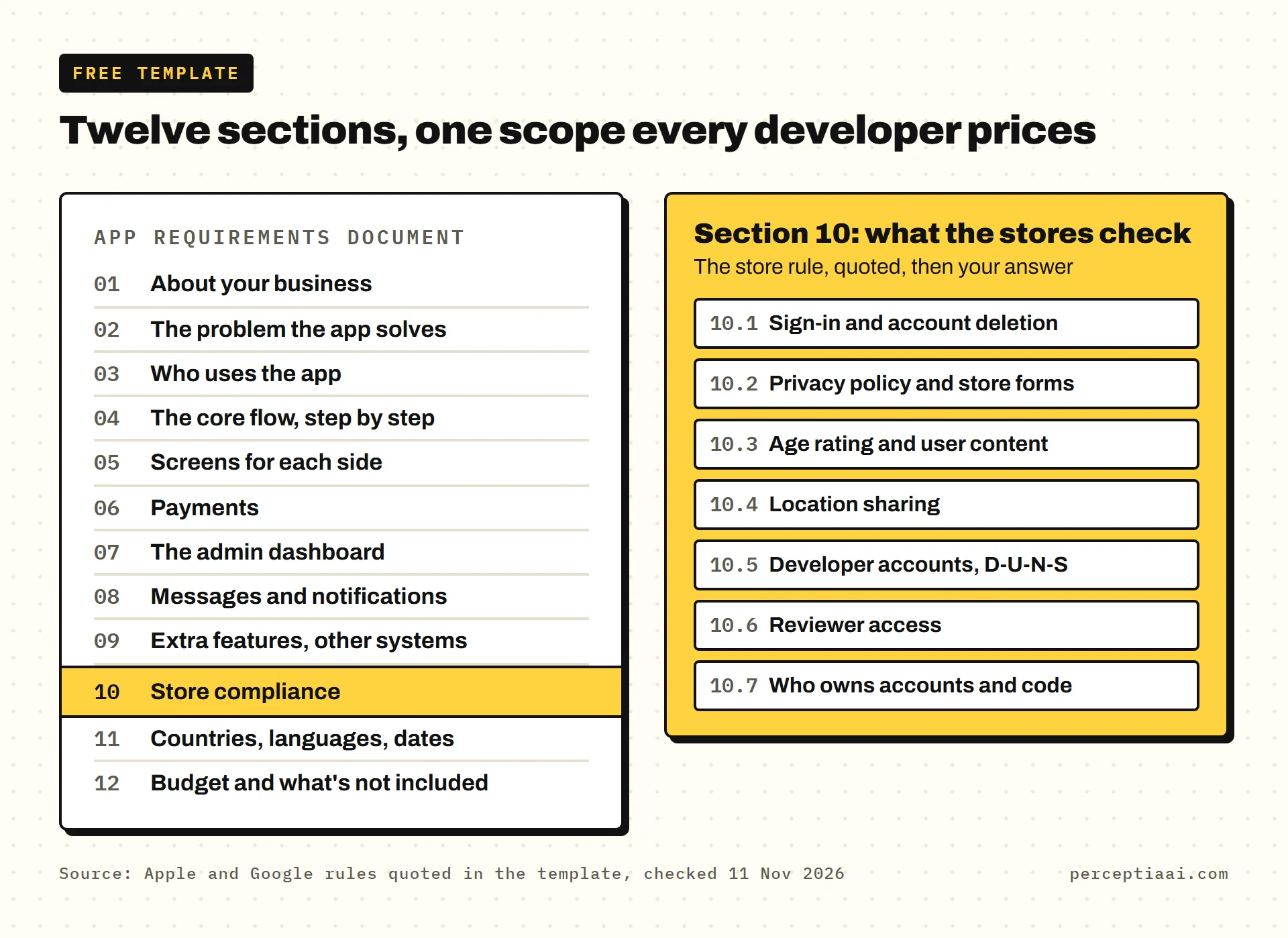
This template is written for small businesses rather than software teams, so it leaves out the engineering jargon and keeps two parts that matter most:
- Room for two sides. Many business apps serve customers and a team: drivers, staff, providers or sellers. Each side gets its own users, screens and login.
- A store-compliance section. Account deletion, privacy forms, age rating, location, developer accounts and ownership: what Apple and Google check before your app goes live.
If you only have one evening, I'd spend it on section 10. It's where quotes tend to stay silent, and it decides whether the app can launch at all.
How to fill it in
You don't need to know how any of it gets built. That's the developer's job, and a good one will ask about the gaps.
- Write what people do, not how it's built. "The driver marks the order delivered and takes a photo" is exactly right.
- Mark every feature Must (you can't launch without it) or Later.
- Write "not sure" rather than leave a gap.
- Ask the people who'll use the app day to day to check sections 3 to 5.
The example lines are for one made-up business: a grocery shop that delivers within 5 miles with 3 drivers. Customers order in one app, drivers work from another, and the shop runs everything from a web dashboard.
1. About your business
- Business name, what you sell, and where.
- Who decides on the app, and who signs off designs?
- Do you have a website, a logo and brand colors?
Example: A grocery shop in one town, delivering within 5 miles. The owner decides and signs off; the shop manager tests each build. Website and logo already exist.

2. The problem the app solves
- What do customers or staff do today without the app: phone calls, WhatsApp, paper, spreadsheets?
- What goes wrong with that?
- How will you know the app worked, 3 months after launch? Pick one or two things you can count.
Example: Orders arrive by phone and WhatsApp, get written on paper and are sometimes missed. Success means most regular customers order in the app and no order is lost.
3. Who uses the app
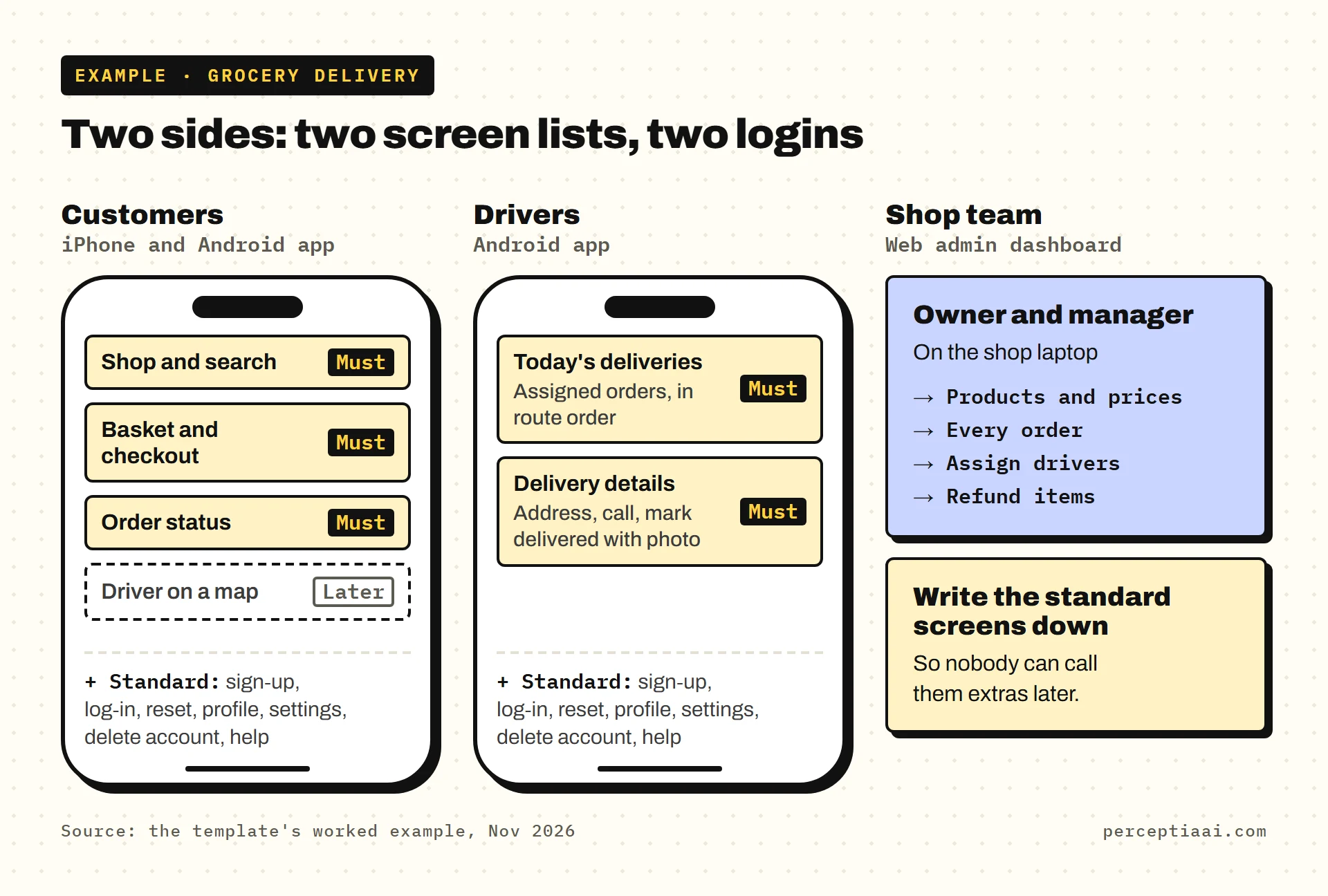
List every kind of user. Each row is a "side"; the rows below are the example.
| Side | Who they are | How many | App, web portal or dashboard | Whose phone or computer |
|---|---|---|---|---|
| Customers | Local households | Hundreds | iPhone and Android app | Their own |
| Drivers | Employed drivers | 3 | Android app | Shop-owned phones |
| Shop team | Owner and manager | 2 | Web admin dashboard | Shop laptop |
- Does each side need its own login?
- Can people look around before they sign up?
- Who creates accounts for your team: do they sign up, or do you invite them?
4. The core flow, step by step
Write the one journey the app must handle on day one, as numbered steps. Say which side does each step, and what happens when something goes wrong.
Example:
- Customer picks items and a delivery slot, then pays by card.
- Shop accepts the order in the dashboard, or rejects it with a reason.
- Shop assigns a driver, who gets a push message.
- Driver collects the order and taps "on the way"; the customer is told.
- Driver taps "delivered" and takes a photo; the customer gets an email receipt.
If an item is out of stock, the shop removes it and the customer is refunded for that item.
5. Screens for each side
List every screen, side by side, and mark each one Must or Later. The rows below are the example.
| Side | Screen | What it does | Must or Later |
|---|---|---|---|
| Customer | Shop and search | Browse by aisle, search by name | Must |
| Customer | Basket and checkout | Pick a slot, pay | Must |
| Customer | Order status | Where the current order is | Must |
| Customer | Driver on a map | Driver's position as they drive | Later |
| Driver | Today's deliveries | Assigned orders, in route order | Must |
| Driver | Delivery details | Address, call customer, mark delivered with photo | Must |
Then list the standard screens for each side: sign-up, log-in, password reset, profile, settings, delete account, and help. Write them down so nobody can call them extras later.
6. Payments
- What do people pay for: physical goods or services used outside the app, or digital content and features unlocked inside it?
- How do they pay: card in the app, cash on delivery, deposit, subscription, invoice?
- Who can issue refunds, and can they be partial?
- Is anyone paid out through the app, such as drivers or sellers?
The first question matters because Apple treats the two differently. Apple's guideline 3.1.3(e), as read on 2026-11-11, says physical goods or services "consumed outside of the app" must use "purchase methods other than in-app purchase", "such as Apple Pay or traditional credit card entry". To unlock digital features, guideline 3.1.1 says "you must use in-app purchase".
Example: Groceries are physical goods, so card payment in the app plus cash on delivery. The manager can refund single items. Drivers are paid through payroll, not the app.
7. The admin dashboard
- What must you see and change without a developer or a new app release?
- Who on your team logs in, and what can each person do?
- Which numbers do you want to see each week?
Example: Add products, change prices, mark items out of stock, see every order, assign drivers, refund items, block a customer. The owner sees everything; the manager can't see revenue. Weekly: orders, revenue, late deliveries.
8. Messages and notifications
List each event that should send a message. The rows below are the example.
| Event | Who's told | Push, email or text |
|---|---|---|
| Order accepted | Customer | Push |
| Driver assigned | Driver | Push |
| Order delivered | Customer | Push and email receipt |
- Should emails come from your own domain?
9. Extra features and links to other systems
- Chat, live map tracking, offline mode, an AI feature, a second language, a web version?
- Systems the app must talk to: till or stock system, accounting, CRM, delivery or SMS services?
- For each one: Must or Later, and why.
Example: Must: prices sync from the shop's stock system so the app matches the till. Later: live driver tracking, customer-to-driver chat, a second language.
10. Store compliance: what Apple and Google will check
Each subsection quotes the store rule, then asks what your app will do. For the full pre-launch list, see the app launch checklist.
10.1 Sign-up, sign-in and account deletion
From Apple's guideline 5.1.1(v) and Google's account deletion policy, as read on 2026-11-11:
- Apple: "If your app doesn't include significant account-based features, let people use it without a login. If your app supports account creation, you must also offer account deletion within the app."
- Google: apps with account creation must "provide users with an in-app path to delete their app accounts and associated data" and "provide a web link resource where users can request app account deletion and associated data deletion."
- Apple's guideline 4.8: if a third-party or social login sets up the main account, you must also offer an equivalent option that "limits data collection to the user's name and email address" and "allows users to keep their email address private".
Your answers:
- How does each side sign in: email, phone code, Google, Apple?
- Where is "delete account" in the app, and what's your web page for deletion requests?
- What data must you keep after deletion, and for how long?
Example: Customers sign up with email or Sign in with Apple and can browse first. Drivers are invited by the manager. Delete account sits in Settings, with a web page at /delete-account. Invoices are kept for as long as our accountant advises. More detail: account deletion requirements.
10.2 Privacy policy and the store privacy forms
From Apple's guideline 5.1.1(i) and App Privacy Details page, and Google's User Data policy and Data safety help, as read on 2026-11-11:
- Apple: "All apps must include a link to their privacy policy in the App Store Connect metadata field and within the app in an easily accessible manner."
- Google: "All apps must post a privacy policy link in the designated field within Play Console, and a privacy policy link or text within the app itself."
- Apple, on privacy labels: "This information is required to submit new apps and app updates to the App Store."
- Google: "All developers that have an app published on Google Play must complete the Data safety form, including apps on closed, open, or production testing tracks."
List what you collect, side by side (example rows):
| Data | From which side | Why | Shared with |
|---|---|---|---|
| Name, email, phone | Customers, drivers | Accounts, delivery contact | Email service |
| Delivery address | Customers | Delivery | The assigned driver |
| Card details | Customers | Payment | Payment provider only |
| Delivery photo | Drivers | Proof of delivery | The customer for that order |
- Who writes the privacy policy, and at what web address will it live?
10.3 Age rating and user content
From Apple's guideline 2.3.6 and Google's content ratings help, as read on 2026-11-11:
- Apple: "Answer the age rating questions in App Store Connect honestly so that your app aligns properly with parental controls."
- Google: "You must complete the content rating questionnaire for each new app submitted to the Play Console", and "Apps without a content rating will be removed from the Play Store."
- If users can post things others see, Apple's guideline 1.2 asks for filtering, reporting, "The ability to block abusive users from the service" and published contact details.
For what each answer means, see App Store age rating; if your app may have users under 18 in the US, also read app store age verification laws.
Your answers:
- Who is the app for, and can under-18s use it?
- Does it sell age-restricted items, or let users post reviews, photos or chat?
Example: Adults only, because the shop sells alcohol; drivers check ID at the door. No reviews or chat at launch.
10.4 Location sharing
From Apple's guideline 5.1.5 and Google's location in the background help, as read on 2026-11-11:
- Apple: "Use Location Services in your app only when it is directly relevant to the features and services provided by the app," and "Ensure that you notify and obtain consent before collecting, transmitting, or using location data."
- Google: "apps that access location in the background must be approved via the permission declaration process in the developer console," with a video demonstration and a prominent in-app disclosure, and only "if it's required for the core functionality of the app."
Your answers:
- Which sides share location, and only while the app is open or also while it isn't in use?
- Who sees it, and how long do you keep it?
Example: Customers type an address; no location needed. Once live tracking is added, drivers share location only during a delivery, the customer sees it only for their own order, and history is deleted after 30 days.
10.5 Developer accounts and D-U-N-S number
From Apple's enrollment page and Google's account type and registration help, as read on 2026-11-11:
- Apple: "Your organization (excluding government entities) must have a D-U-N-S Number so that we can verify your organization's identity, legal entity status, and address." It adds: "We do not accept DBAs, fictitious business names, trade names, or branches." For an individual, "Your name will be displayed as the seller name of your apps on the App Store." The fee is "99 USD per membership year".
- Google: "To create a developer account for an organization, you must provide a D-U-N-S number," and applying is "a completely free process". There is "a US$25 one-time registration fee."
Your answers:
- Will you publish as a company or as an individual?
- Your legal entity name, exactly as registered, and your D-U-N-S number (or the date you applied).
- Who will be the account holder?
Example: Organization accounts on both stores, in the company's registered name. D-U-N-S number requested the day we decided to build. The owner is the account holder. Steps: D-U-N-S number for the app stores.
10.6 Reviewer access
From Apple's guideline 2.1 and Google's app access help, as read on 2026-11-11:
- Apple: "include demo account info (and turn on your back-end service!) if your app includes a login."
- Google: "you must provide all required details to enable access to your app."
Your answers:
- A test login for each side that keeps working during review.
- Anything that only works in your area, such as a delivery radius, and how a reviewer elsewhere will see it work.
Example: A reviewer customer account with a saved address inside the delivery area, and a reviewer driver account with a test order already assigned. Steps for placing a test order go in the review notes.
10.7 Who owns the accounts and the code
From Apple's guideline 5.2.1, as read on 2026-11-11: "Apps should be submitted by the person or legal entity that owns or has licensed the intellectual property and other relevant rights."
List each account (example rows):
| Account | In whose name | Who has admin access |
|---|---|---|
| Apple Developer and Google Play Console | The company | Owner; developer invited |
| Code repository, such as GitHub | The company | Owner; developer invited |
| Database and hosting | The company | Owner; developer invited |
| Domain, email sending, payment provider, maps | The company | Owner |
- When does ownership of the code and designs pass to you? Get the answer into the contract.
- What will the handover pack contain if you change developers?
Example: Every account in the company's name, opened before the build starts. Code in the company's GitHub from the first commit; ownership passes as each milestone is paid. Why it matters: how to choose an app development company.
11. Launch countries, languages and dates
- Which countries' stores, and which languages?
- iPhone, Android or both? Phones only, or tablets too?
- A launch date, and why that date?
- Who writes the store description, and who makes the screenshots?
Example: UK only, in English, on iPhone and Android phones. Launch before the busy winter months. We write the product text; the developer makes the screenshots.
12. Budget, open questions and what's not included
- Your budget range for the build, and for running costs each month.
- Your Later list, in the order you'd add it.
- What you'll supply yourself: photos, product data, text.
- What you expect to pay for directly: store fees, hosting, content.
- Anything you're unsure about.
Example: Build budget up to $8,000. First to add after launch: live tracking. We supply product photos and prices as a spreadsheet. Not sure yet: whether drivers need their own app or could start with the dashboard.
What to do once it's filled in
Send the same document to every developer you're talking to, and ask each one to quote against it line by line. Then use our questions to ask an app developer on the call.
When the quotes come back, I'd read each one against section 10 before looking at the total. A quote that says nothing about account deletion or developer accounts hasn't priced them yet.
- Every side has its own row in section 3 and its own screen list in section 5
- The core flow covers what happens when something goes wrong
- Every feature is marked Must or Later
- Section 10 is answered, even where the answer is 'not sure'
- Each quote you get back lists every screen and a written list of exclusions
- Where a quote says nothing about section 10, you've written 'not stated' and asked
If you do one thing this week, I'd make it sections 3 and 5: fill them in for every side of the app, even roughly. Those two tables are what turn a guess into a price. The rest can follow.
If you'd like us to price it
Send your filled-in template for an App Preview. For $299, in 5 working days, you get your core flow clickable on your own phone, the full screen list and one fixed price with three options, held for 30 days. You keep all of it, even if you build elsewhere.