

A vibe coded app security checklist covers what AI builders such as Lovable, Bolt, Replit, Base44, Cursor and Claude most often miss: secret keys inside the app, database rules that let anyone read every row, payments the server never checks and personal data in logs. Phone apps add two more: a build anyone can unpack, and store privacy rules.
My view: the risk isn't that an AI tool wrote the code. It's that nobody checked the paths it didn't test, such as another user's data, a forged payment or a key left in the app. So each of the 22 checks comes with a test you can run yourself or hand to a developer. Sources were checked against their own pages on 11 November 2026. For the wider route to the stores, see getting an AI-built app into the app stores.
Why a phone app raises the stakes
Most checklists for AI-built apps are written for web apps. A phone app changes three things:
- Everything in it is readable. Anyone can download the app and look inside, and you can't recall copies already on phones.
- Fixes wait for review. A website can be patched in minutes; a new app version goes back through review.
- You vouch for your data handling. Apple's guideline 1.6 asks apps to "implement appropriate security measures", and your privacy labels are declarations you make.
The second point is the one I'd plan around. A mistake you find after launch waits for review like any other update.

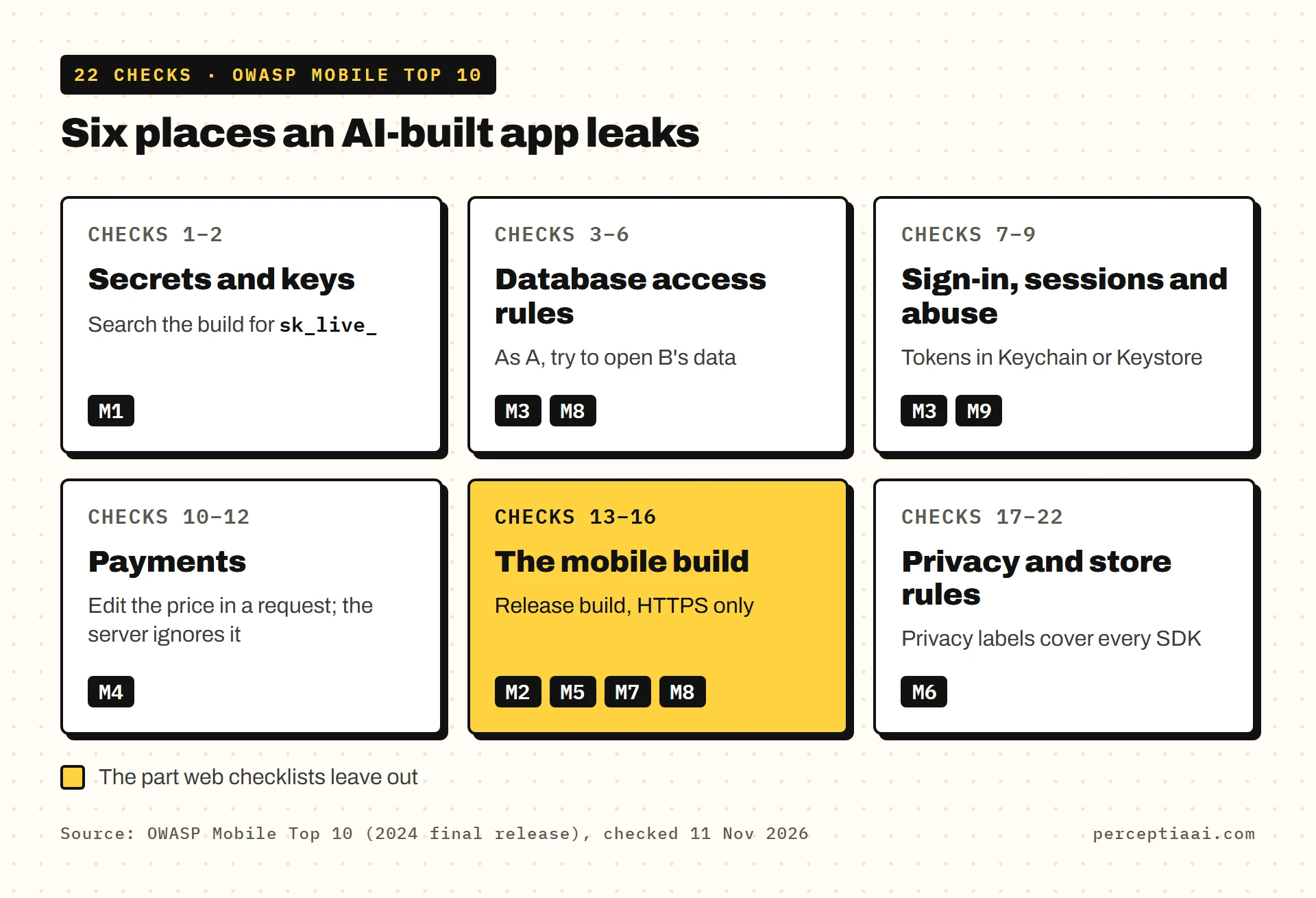
The groups follow the OWASP Mobile Top 10, whose current list is the 2024 final release:
| Group | Checks | Closest OWASP risk |
|---|---|---|
| Secrets and keys | 1–2 | M1 Improper Credential Usage |
| Database access rules | 3–6 | M3 Insecure Authentication/Authorization, M8 Security Misconfiguration |
| Sign-in, sessions and abuse | 7–9 | M3 Insecure Authentication/Authorization, M9 Insecure Data Storage |
| Payments | 10–12 | M4 Insufficient Input/Output Validation |
| The mobile build | 13–16 | M2 Inadequate Supply Chain Security, M5 Insecure Communication, M7 Insufficient Binary Protections, M8 Security Misconfiguration |
| Privacy and store rules | 17–22 | M6 Inadequate Privacy Controls |
Secrets and keys
-
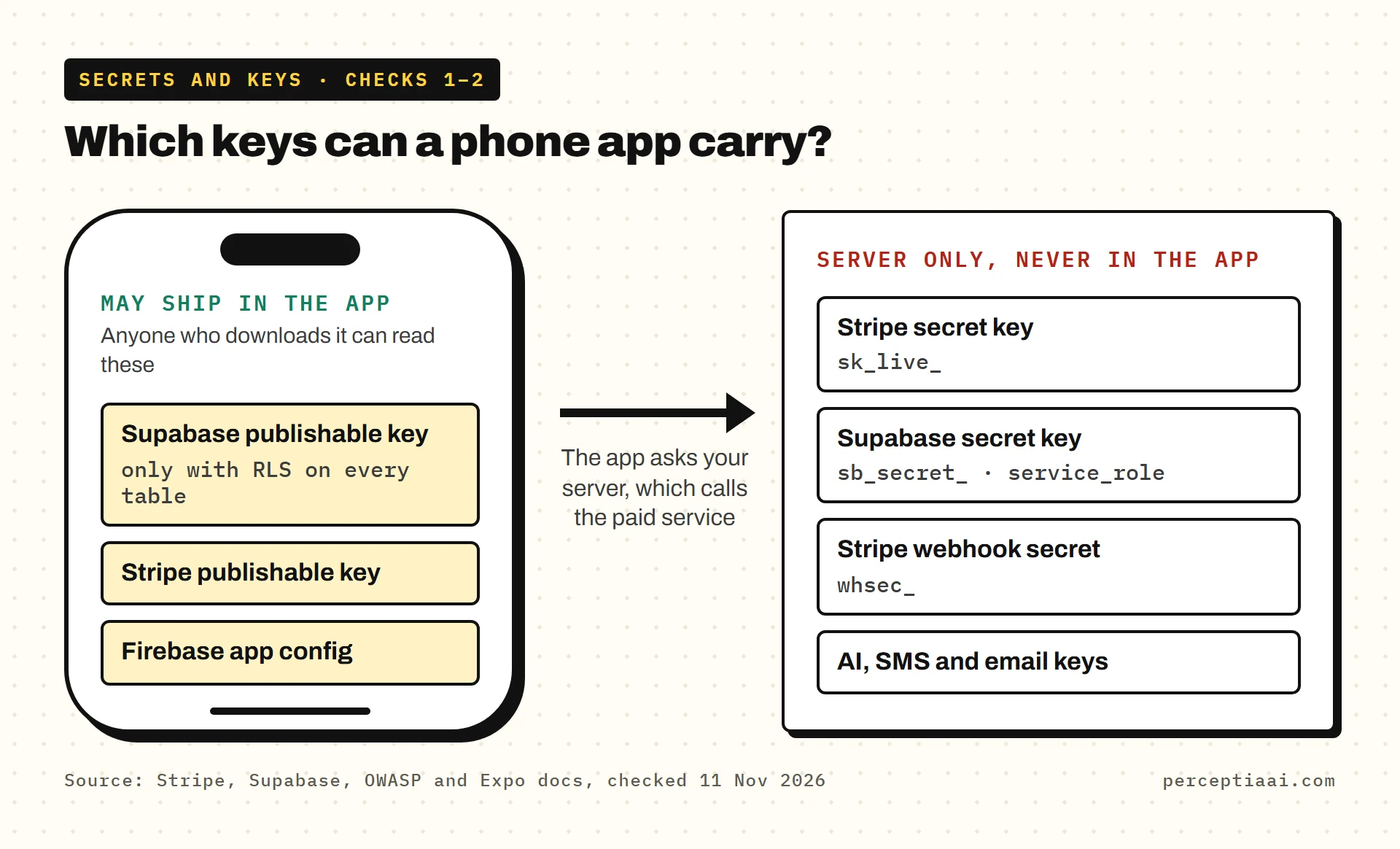
No secret key ships in the app, its JavaScript or its code history. OWASP puts it plainly: "Always avoid using hardcoded credentials in your mobile app's code or configuration files." The trap is the public prefix on environment variables. Expo warns that
EXPO_PUBLIC_values "will be visible in plain-text in your compiled application", and Vite saysVITE_variables, used in older Lovable apps, "will be exposed in client-side source code."How to check: Have a developer search the built app, the live site's JavaScript and the code history for
sk_live_,sb_secret_,service_roleandsecret. Replace any key that was ever exposed. -
Paid services are called from your server, not the app. Stripe says "Only publishable keys are safe to expose outside your application's back end." AI, SMS and email keys belong in server functions.
How to check: List every outside service and ask where its key lives. "On the server" is the only right answer, apart from publishable keys and Firebase's app config.
Database access rules
Supabase and Firebase apps often read the database straight from the phone, so the rules are your security.
If I could run only one group, it would be this one.
-
Supabase: Row Level Security is on for every table, with policies. Supabase is direct: "Enable RLS on every table in an exposed schema." Without it, its Security Advisor docs say, "anyone with the project's URL can CREATE/READ/UPDATE/DELETE (CRUD) rows in the impacted table."
How to check: In the Supabase dashboard, open Advisors, then Security Advisor, and clear every warning about RLS.
-
Firebase: no test-mode or "any signed-in user" rules. Firebase: "If you're not authenticating users and configuring security rules, then anyone who guesses your project ID can steal, modify, or delete the data." Signing users in isn't the whole fix either: "If one of your rules includes auth != null, confirm that you want any logged-in user to have access to the data."
How to check: In the Firebase console's Rules tabs, look for
if true, a date check onrequest.time, orauth != nullon everything, then test in the Rules Playground. -
One user can't read or change another user's data. RLS switched on with a let-everyone-through policy is still open.
How to check: Make two test accounts. Signed in as A, try to open B's order or file by changing the ID in a link or request. Reading and editing should both fail. This is the test I'd run first; it needs no tools, just two accounts.
-
Users can't change their own role or plan. If the role or paid plan sits in a row the user can update, anyone can make themselves an admin or a paying customer.
How to check: Ask whether a signed-in user can update the row that holds roles and plans. The answer must be no.
Sign-in, sessions and abuse
-
Server functions check who's calling. A function using a secret key skips your database rules. Supabase limits secret keys to "servers, APIs with their own authorization checks, Edge Functions, and microservices".
How to check: For each server function, ask: does it read the user from the sign-in token, or trust a user ID the app sends? Only the first is safe.
-
Sign-in tokens are stored securely. OWASP: "Use platform-specific secure storage mechanisms provided by the mobile operating system, such as Keychain (iOS) or Keystore (Android)."
How to check: Ask where the app keeps the token; Keychain or Keystore is the answer you want. Then sign out, reopen the app and press back: no private screen should appear.
-
Costly calls have rate limits and spending caps. OWASP API4:2023: "Configure spending limits for all service providers/API integrations."
How to check: In Supabase, open Authentication, then Rate Limits. For your AI, SMS and email functions, ask what stops one person calling them 1,000 times a minute, and set a cap or billing alert with each provider.
Payments
The rule for all three checks is the same: the phone asks, the server decides.
-
The server sets the price and grants the unlock. Google's billing security page says to "move sensitive data and logic to a backend server that you control".
How to check: Ask what happens if someone edits the amount, or an
is_paidfield, in the app's request. The server should ignore it and look both up itself. -
Stripe webhooks check the signature. Stripe: "Without verification, an attacker could send fake webhook events to your endpoint to trigger actions like fulfilling orders, granting account access, or modifying records."
How to check: The webhook code should verify the
Stripe-Signatureheader with thewhsec_secret through Stripe's library, reject failures and skip event IDs it has already handled. -
In-app purchases are verified on your server. Google says to use the Play Developer API "to verify with Google that the purchase is legitimate." Apple's App Store Server API is "a REST API that you call from your server" for the same job.
How to check: Ask where a purchase becomes access. "Our server, after checking with Apple or Google" is right. "The app, when the purchase sheet closes" isn't.
The mobile build
This is the part web checklists leave out.
-
The store build is a release build on the live backend. OWASP: "Disable debugging features in the production version of the app." Android's docs note that "app stores do not accept apps that are marked debuggable."
How to check: Confirm the upload is a release build on the live database and keys, with no developer menus or debug screens.
-
Every connection uses HTTPS. Apple's App Transport Security "requires that all HTTP connections made with the URL Loading System ... use HTTPS", and on Android 9 and later "cleartext support is disabled by default."
How to check: Search the iOS
Info.plistforNSAllowsArbitraryLoadsand the Android project forusesCleartextTrafficorcleartextTrafficPermitted="true". Each hit needs a reason. -
Your backend can tell your real app from a copy. Firebase App Check "helps protect your app backends from abuse." On iOS, App Attest lets you "Ensure that requests your server receives come from legitimate instances of your app." None of these is a lock on its own. On Android, Play Integrity checks for "your genuine app, installed by Google Play", but Google says to use it "not as your sole anti-abuse mechanism."
How to check: On Firebase, turn on App Check, then enforcement. On other backends, ask whether paid or sensitive endpoints verify an App Attest or Play Integrity token.
-
Your packages have no known high or critical vulnerabilities. npm audit "asks for a report of known vulnerabilities" in your dependencies.
How to check: Run
npm audit, fix anything rated high or critical, and run it again before every release.
Privacy and store rules
-
No personal data or tokens in logs, crash reports or analytics. OWASP: "logs and error messages might contain PII if the developers chose to include this data in log or error messages". Note the word "chose": it's a choice you can undo with a search.
How to check: Search the code for
console.logandprintlines that output a user, token or request, then open one recent event in your crash and analytics tools. -
A privacy policy is linked in App Store Connect and in the app. Apple's 5.1.1(i): "All apps must include a link to their privacy policy in the App Store Connect metadata field and within the app in an easily accessible manner."
How to check: Find the link in the app's settings, then compare the policy with your list of services from check 2.
-
Privacy labels and Data safety match the app, SDKs included. Apple: "You need to identify all of the data you or your third-party partners collect." Google: "You alone are responsible for making complete and accurate declarations," and may take "enforcement action" when the two disagree.
How to check: List every SDK (analytics, crash reports, payments, AI, maps) and what it sends, then fill in both forms from that list. I'd build the list from the code, not from memory; Apple's wording covers your partners' collection as well as yours.
-
Data sent to an AI provider is disclosed, with permission first. Apple's 5.1.2(i): "You must clearly disclose where personal data will be shared with third parties, including with third-party AI, and obtain explicit permission before doing so."
How to check: If anything a user types, uploads or says goes to an AI service, show a notice naming it and ask before the first time.
-
Accounts can be deleted inside the app. Apple's 5.1.1(v): "If your app supports account creation, you must also offer account deletion within the app." Google also wants a web link; see account deletion requirements.
How to check: Create an account, delete it in the app, try to sign in again, then open the web deletion link on a laptop.
-
The app doesn't download code that changes what it does. Guideline 2.5.2 says apps may not "download, install, or execute code which introduces or changes features or functionality of the app." Apple's license agreement, section 3.3.1(B), allows downloaded interpreted code only if it "does not change the primary purpose of the Application."
How to check: If you push changes outside the store, through an over-the-air update service or a wrapper that loads your live site, keep them within what Apple reviewed. Guideline 2.5.19 also rules out "hidden, dormant, or undocumented features".
Apple and vibe coding in 2026: what's confirmed
In March 2026, 9to5Mac reported that Apple was blocking updates to vibe-coding apps such as Replit and Vibecode, and on March 30 that it had removed one called Anything, citing guideline 2.5.2. These are press reports about apps that build and run other apps inside themselves, not apps made with AI tools.
So if you built your app with an AI tool, this news isn't about you. Check 22 is.
Apple's June 8, 2026 update says its change to the spam rule, 4.3(b), "clarifies the basis for the guideline and adds examples." That rule opens: "Don't submit apps that are indistinguishable from what's already widely available." The notice doesn't mention AI tools. For apps that are mostly a website in a frame, see guideline 4.2 on minimum functionality.
The full checklist
- No secret keys in the app or code history
- Paid services called from the server
- Supabase RLS on every table, with policies
- Firebase rules locked down
- Two-account test passed
- Users can't change their own role or plan
- Server functions check the sign-in token
- Tokens in Keychain or Keystore
- Rate limits and spending caps set
- Server sets prices and grants unlocks
- Stripe webhook signatures verified
- In-app purchases verified on the server
- Release build on the live backend
- HTTPS only, no unexplained exceptions
- App Check, App Attest or Play Integrity switched on
- npm audit: no high or critical issues
- No personal data in logs or analytics
- Privacy policy linked in the store and the app
- Privacy labels and Data safety match every SDK
- AI data sharing disclosed and agreed
- In-app account deletion, plus a web link
- No downloaded code that changes the app's purpose
If you do one thing this week, make two test accounts and run check 5. Then open Supabase's Security Advisor or your Firebase rules. If either one fails, that's what I'd fix before anything else on this list.
If you'd rather hand this list over
Our App Check (a service, not Firebase's feature of the same name) is $249 or $449 and takes 2–4 working days. You get a plain-English report on what works, the safety problems, likely store rejections and who controls which accounts, with a clear fix, launch or rebuild answer at one fixed price. It's part of App Rescue.