

Guideline 4.2, Minimum Functionality, is the App Store rule that rejects apps that are just a website in a frame. Apple's wording: "Your app should include features, content, and UI that elevate it beyond a repackaged website. If your app is not particularly useful, unique, or 'app-like,' it doesn't belong on the App Store." To pass, the app has to do a real job on the phone, feel like an app, and not depend on a browser experience the user could get anyway.
My view: a 4.2 rejection is a product problem, not a paperwork problem. My own work includes a UK car marketplace with a Flutter app on the App Store, and the question I'd ask of any wrapper is the one the reviewer asks: why would someone install this instead of opening the website?
Rules checked against Apple's and Google's own pages on 11 November 2026.
What guideline 4.2 says
Apple's App Review Guidelines, section 4.2, opens with the line every wrapper is measured against:
4.2 "Your app should include features, content, and UI that elevate it beyond a repackaged website. If your app is not particularly useful, unique, or 'app-like,' it doesn't belong on the App Store. If your App doesn't provide some sort of lasting entertainment value or adequate utility, it may not be accepted."
4.2.2 "Other than catalogs, apps shouldn't primarily be marketing materials, advertisements, web clippings, content aggregators, or a collection of links."
That second one is the brochure-app rule. Opening hours and a contact form are a website, whatever you wrap them in.
4.2.3(i) "Your app should work on its own without requiring installation of another app to function."
Notice what's missing: the rule never says "no WebViews". Apple judges the result, not the technology. A WebView-based app can pass, and a fully native app that's only a brochure can fail.

Who gets 4.2 rejections
The rejection usually lands on one of these:
| Starting point | Why it gets flagged |
|---|---|
| Website wrapped with a WebView tool | Same pages, same navigation, browser feel |
| PWA submitted through a wrapper | Nothing the PWA couldn't already do in Safari |
| No-code web app (Bubble, Glide, Softr) | Web layouts, web menus, slow page loads |
| App built with a web-first AI builder | Usually a web app underneath, wrapped late or by the builder's publish button |
| Brochure app for a business | Opening hours, a menu PDF, a contact form, links |
The last row is the hardest to rescue, because there's nothing underneath to make app-like.
If your app is a web app or no-code app, read how to publish a web app to the app stores. If it came from Lovable, Bolt, Replit or Base44, see getting an AI-built app into the app stores, and run the vibe-coded app security checklist before you submit.
What changed in 2026
Guideline 4.2 reads the same today as when we first quoted it. Three things around it changed, and they matter most for wrappers:
- AI builders now wrap for you. Base44's store publishing runs your published web app "inside a secure web view", which it calls "a lightweight native wrapper around your web app that opens only your app's URL", according to the Base44 docs. A one-click wrapper is judged like any other wrapper, so everything below still applies.
- Changing the app after approval is now its own rule. Apple added guideline 2.5.19 on October 16, 2026: "Don't include any hidden, dormant, or undocumented features in your app; your app's functionality should be clear to end users and App Review." A wrapper changes whenever the website does, so ship new features in a reviewed update, not silently through the web.
- The neighboring spam rule was revised. On June 8, 2026 Apple revised guideline 4.3 (Apple news). 4.3(b) says: "Don't submit apps that are indistinguishable from what's already widely available." A template app with a new name can fail 4.3 even when it would pass 4.2.
Of the three, 2.5.19 is the one I'd plan around. Updating a wrapper by changing the website was always the appeal, and it's now the risk.
What reviewers look for
Reviewers open the app and ask, roughly: would anyone want this installed instead of a bookmark? A bookmark is free and never needs an update, which is a hard thing to beat. They notice:
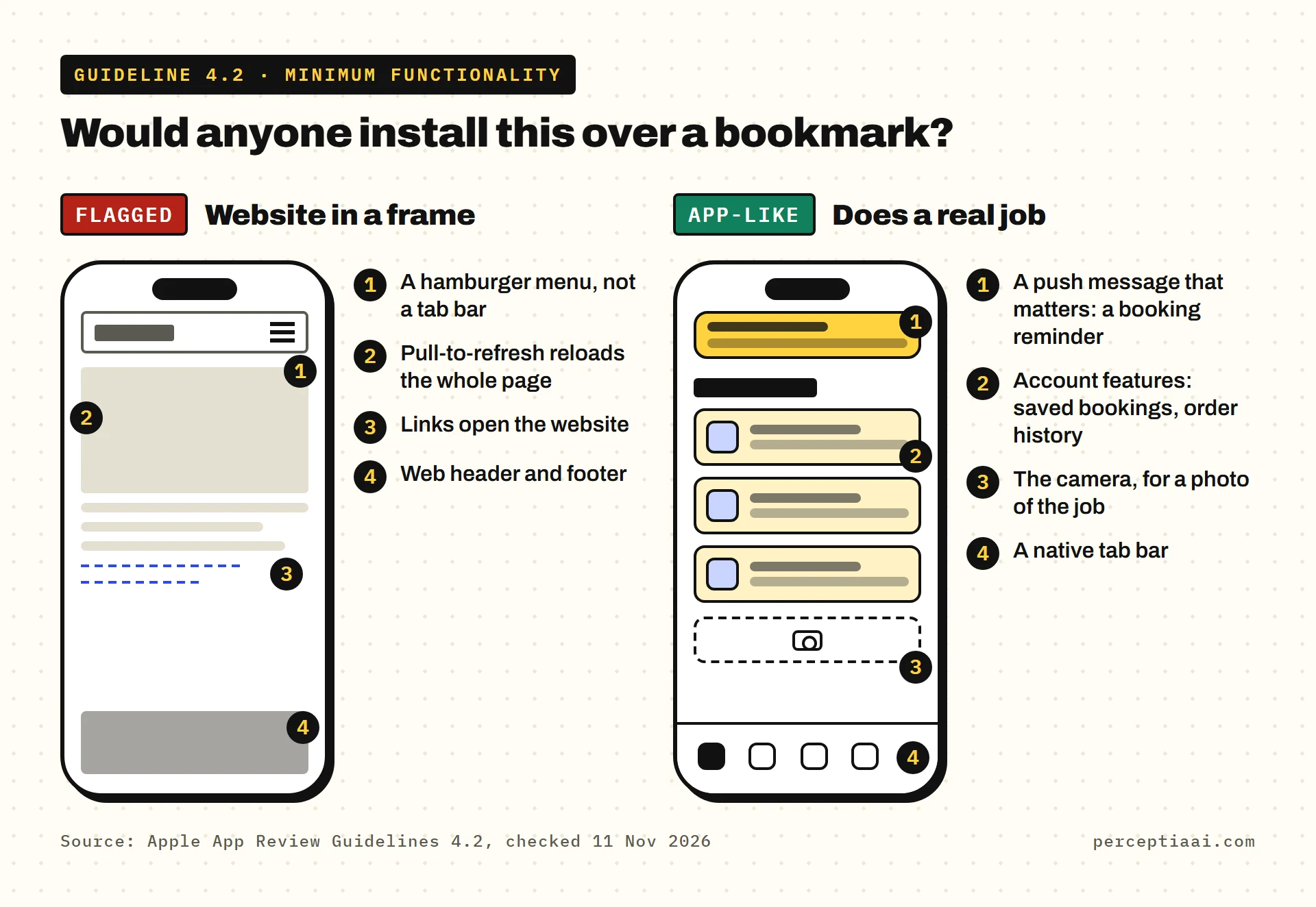
- Browser tells. Pull-to-refresh reloading the whole page, a web header and footer, a hamburger menu instead of a tab bar, links that open the website, a login page that looks like a website form.
- No reason to be on the phone. Nothing that uses being installed: no reminders, no saved state, no camera, no offline use, no account features.
- Thin content. A few pages of information that change rarely, or a list of links out.
- Breakage. Slow loads, a blank screen on poor signal, or pages that aren't sized for a phone.
Browser tells are the cheapest to fix, so that's where I'd start.
What I'd change first
There's no magic feature. These move an app from "repackaged website" toward "app-like" when they serve its real job:
- Native navigation. A tab bar and native screens for the main flow, not the website's menu.
- Account features. Saved bookings, order history, favorites, a profile, with in-app account deletion (which Apple requires anyway).
- Push messages that matter. Booking reminders, order updates, a reply to a message. Not "check out our blog".
- Phone capabilities the job needs. Camera for uploading a photo of a job, location for nearby results, biometrics for sign-in, offline access to things already loaded.
- Speed and polish. Screens that load instantly from cached data and work on a poor connection.
The order matters less than the reason. A feature with no job is the "bolted on" kind reviewers see through.
When a wrapper won't pass
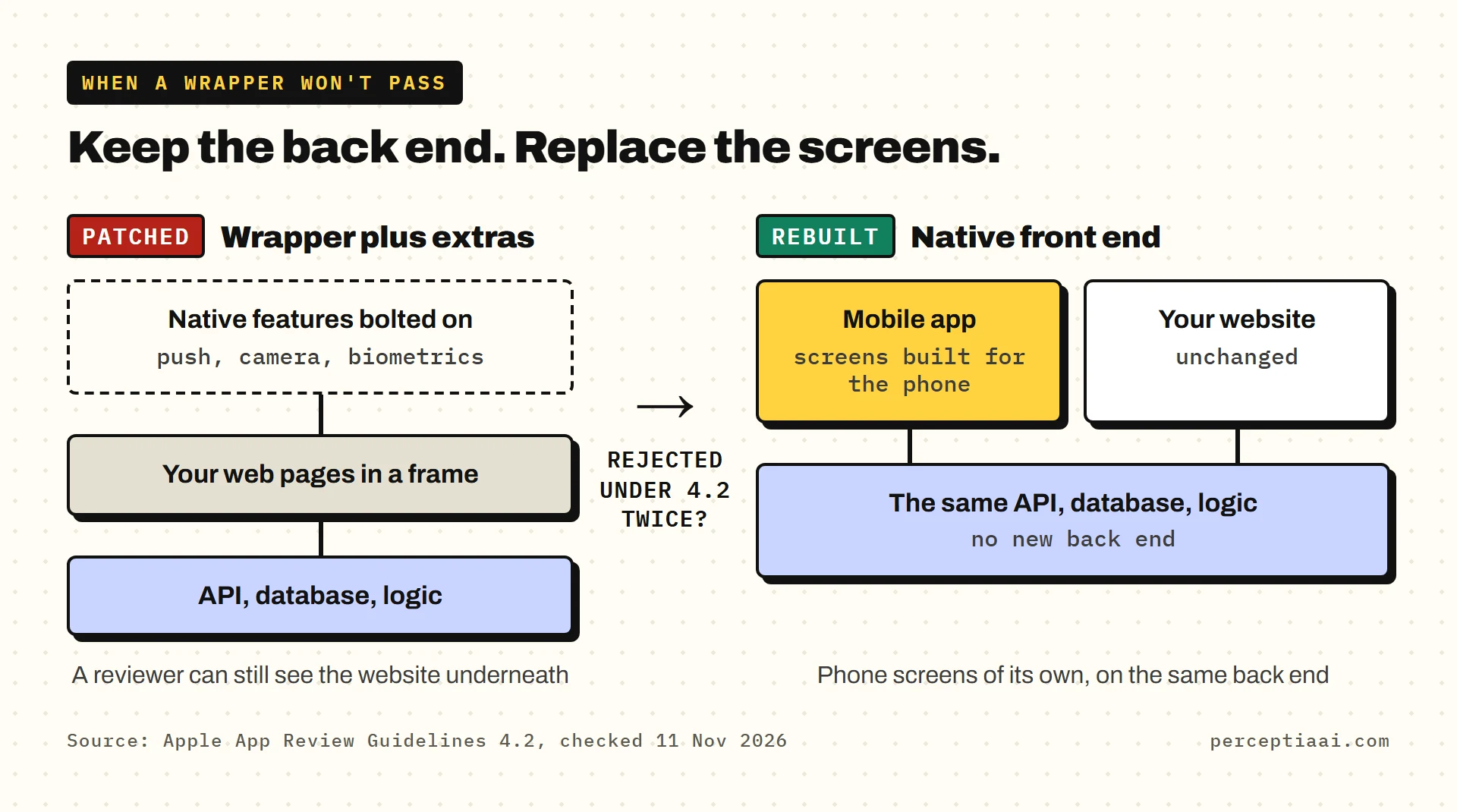
Some apps can't be wrapped into compliance. If the core of your product is your web UI, every extra native feature is a patch on top, and a reviewer can still see the website underneath. Signs you're in that position:
- You've been rejected under 4.2 twice, after adding features.
- The app's main screens are your web pages, and changing them would change the website too.
- Your web layout wasn't designed for a phone screen.
I'd rather say this before a third submission than after it.
In that case, the cleaner route is a native app on top of your existing back end. Your web product keeps its API, database and logic, and the mobile app gets its own screens built for the phone. That's what our Companion App is: a mobile app on your existing web product's API, with no new back end, built to meet Apple's 4.2 rule from the start. It's $3,490 at Starter size or $6,500 at Growth size.
What about Google Play?
Google has a similar policy. Its spam and minimum functionality rules say: "We do not allow apps that only have limited functionality and content." Apple's wording is the more specific of the two, so an app built to pass 4.2 is usually in good shape for Google's rule too. New personal Google accounts also have to pass a 12-tester, 14-day closed test before production, which is a separate hurdle.
How to reply to a 4.2 rejection
- Read the rejection for the specific sub-rule (4.2, 4.2.2 or 4.2.3) and any screenshots
- List what the app does that the website can't, in plain words
- Fix the browser tells: native navigation, no web header or footer, no links out for core tasks
- Add the account and phone features that serve the app's real job
- Test on a real iPhone on a poor connection and a clean install
- Resubmit with review notes that explain the main flow and the app-only features
- If rejected again, stop patching and consider a native front end on your existing back end
An appeal can work when a reviewer has clearly missed a feature, but it rarely works for an app that really is a repackaged website. It's usually quicker to change the app. If you do appeal, read how to appeal an App Store rejection first.
If you do one thing this week, write the sentence from "The honest test" above and show it to someone who has never seen your app. If it doesn't convince them, I wouldn't resubmit yet.
For the full set of things Apple and Google check, see the app launch checklist.
Changelog
- 2026-11-11: Rechecked guideline 4.2, 4.2.2 and 4.2.3(i) and Google's spam and minimum functionality policy; the wording is unchanged.
- 2026-11-11: Added a section on 2026 changes: one-click wrappers from AI builders, Apple's new guideline 2.5.19 and the June 2026 revision of guideline 4.3.